Your name in lights! (Part 6) (BBC BASIC)


Last time in Your name in lights! (Part 5), we get a basic scrolltext working and were able to scroll any message of our choosing.
We're going to be building on that foundation here, so if you skipped earlier parts or are still a little shaky on the fundamentals you might want to go back and read them again.
To move forward, I'm going to assume that you've got SLIDE.COM on the B: drive of your 'Beast, and that you have the corresponding PC utility installed somewhere in your PATH on your development PC. Refer to the SLIDE README if you need more help with that.
I'm also going to assume that you have BBCBASIC.COM on your B drive.
Set up
First things first: clone the Beast User repository on to your development PC.
We're going to start in the scrolltext/bbc_basic/effects folder.
Background info
This time, we're going to build on our scrolltext program from before, but add a little bling.
In the first installment of this series I pointed you at the LED driver datasheet and just on the off-chance that you didn't pore over this document at the time, let me quote a bit of it here:
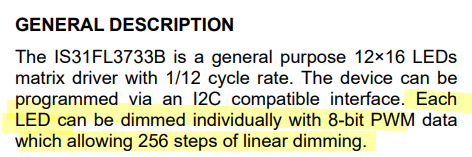
What this is telling us is that we can change the brightness of each character on our LED display, and that each character can be set to 256 different brightness levels!
This means we can do some cool fading effects by varying the brightness. In fact you might have noticed something similar when the 'Beast first boots. The fact that the firmware is already doing this might lead you to hope that perhaps there's a BIOS routine we can call to do the heavy lifting for us, and your faith is rewarded:
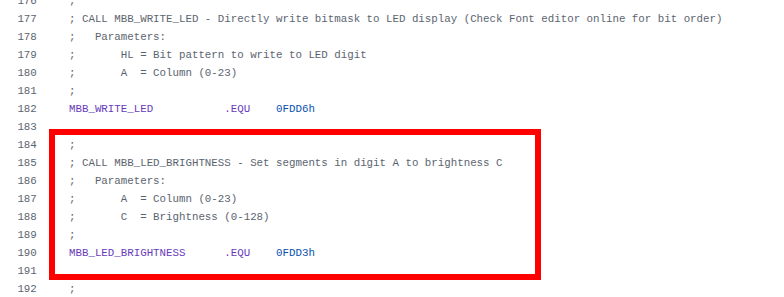
I've left the familiar MBB_WRITE_LED code on there for reference. This time we're interested in MBB_LED_BRIGHTNESS, and we can see that the address this resolves to (0FDD3h) is different from MBB_WRITE_LED (&FDD6), and moreover this time the column is passed in the A register as before, but this time brightness is passed in the C register. (Note that the comment in the firmware header is wrong; there are actually 256 brightness levels, not 128.)
The rough plan is, we'll send lovely shimmering waves of varying brightness along our text string as it's scrolling. In order to pull this off, we'll construct a lookup table where we've pre-computed brightness levels so that they follow a sine wave pattern, like this:
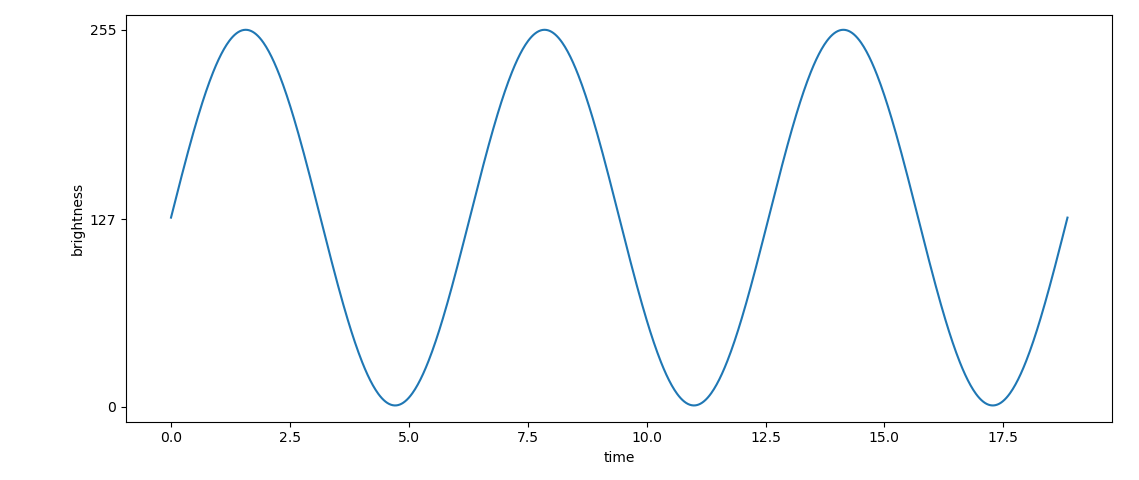
We could generate this lookup table in BASIC using the SIN() function, but it's a little awkward and frankly a lot easier to generate the values and cast them to integer values in the correct range using a python script on a modern PC, so that's exactly what I did.
Here's the code we'll be running this time:
10 REM === MicroBeast LED Demo - Step 5: Sine Wave Brightness (BBC BASIC) ===
20 REM Scrolling text with a sine-wave brightness effect. The brightness
30 REM wave scrolls independently of (and faster than) the text.
40 REM
50 REM Two BIOS routines are used. BBC BASIC loads the Z80 registers
60 REM from the static integer variables A%-L% before a CALL, so each
70 REM is just a couple of lines - no machine-code stubs required:
80 REM   MBB_WRITE_LED      (&FDD6): HL = bitmask,  A = column
90 REM   MBB_LED_BRIGHTNESS (&FDD3): A  = column,   C = brightness
100 REM
110 REM --- Load font data into an array (ASCII 32-126) ---
120 DIM font%(94)
130 FOR idx% = 0 TO 94 : READ font%(idx%) : NEXT
140 REM
150 REM --- Load sine table (64 entries) ---
160 DIM sine%(63)
170 FOR idx% = 0 TO 63 : READ sine%(idx%) : NEXT
180 REM
190 REM --- Get user input ---
200 INPUT "Enter scroll text: " text$
210 REM
220 REM --- Build padded buffer: 24 spaces + text + 24 spaces ---
230 pad$ = "                        " : REM 24 spaces
240 buf$ = pad$ + text$ + pad$
250 buflen% = LEN(buf$)
260 REM
270 PRINT "Scrolling with effects... press ESCAPE to stop"
280 offset% = 1 : REM text scroll position (1-based)
290 boff% = 0   : REM brightness wave offset
300 frame% = 0  : REM frame counter
310 REM
320 REPEAT
330   REM --- Paint the 24 visible characters ---
340   FOR col% = 0 TO 23
350     ch% = ASC(MID$(buf$, offset% + col%, 1)) - 32
360     IF ch% < 0 OR ch% > 94 THEN ch% = 0
370     PROCled(font%(ch%), col%)
380   NEXT
390   REM --- Animate the brightness wave 4 times per text step ---
400   REPEAT
410     FOR col% = 0 TO 23
420       PROCbright(sine%((col% + boff%) AND 63), col%)
430     NEXT
440     boff% = (boff% + 1) AND 63
450     frame% = (frame% + 1) AND 3
460   UNTIL frame% = 0
470   REM --- Advance text position, wrapping at the end ---
480   offset% = offset% + 1
490   IF offset% > buflen% - 23 THEN offset% = 1
500 UNTIL FALSE
510 END
520 REM
530 REM --- Write bitmask bm% to LED column col% via MBB_WRITE_LED ---
540 DEF PROCled(bm%, col%)
550 A% = col% : L% = bm% MOD 256 : H% = bm% DIV 256
560 CALL &FDD6
570 ENDPROC
580 REM
590 REM --- Set brightness br% (0-255) of LED column col% via MBB_LED_BRIGHTNESS ---
600 DEF PROCbright(br%, col%)
610 A% = col% : C% = br%
620 CALL &FDD3
630 ENDPROC
640 REM
650 REM --- Font DATA (ASCII 32-126, 95 entries) ---
660 DATA &0000, &4900, &0202, &12CE, &12ED, &2DE4
670 DATA &0B59, &0200, &0C00, &2100, &3FC0, &12C0
680 DATA &2000, &00C0, &4000, &2400
690 DATA &243F, &0406, &00DB, &008F, &00E6, &0869
700 DATA &00FD, &1401, &00FF, &00EF, &0040, &2200
710 DATA &0C40, &00C8, &2180, &5083
720 DATA &02BB, &00F7, &128F, &0039, &120F, &0079
730 DATA &0071, &00BD, &00F6, &1209, &001E, &0C70
740 DATA &0038, &0536, &0936, &003F
750 DATA &00F3, &083F, &08F3, &00ED, &1201, &003E
760 DATA &2430, &2836, &2D00, &00EE, &2409
770 DATA &0039, &0900, &000F, &2800, &0008
780 DATA &0100, &208C, &0878, &00D8, &208E, &2058
790 DATA &14C0, &048E, &1070, &1000, &2210
800 DATA &1E00, &1200, &10D4, &1050, &00DC
810 DATA &0170, &0486, &0050, &0888, &0078
820 DATA &001C, &2010, &2814, &2D00, &028E
830 DATA &2048, &2149, &1200, &0C89, &24C0
840 REM
850 REM --- Sine table (64 entries, values 0-255) ---
860 DATA &0080, &008C, &0098, &00A5, &00B0, &00BC, &00C6, &00D0
870 DATA &00DA, &00E2, &00EA, &00F0, &00F5, &00FA, &00FD, &00FE
880 DATA &00FF, &00FE, &00FD, &00FA, &00F5, &00F0, &00EA, &00E2
890 DATA &00DA, &00D0, &00C6, &00BC, &00B0, &00A5, &0098, &008C
900 DATA &0080, &0073, &0067, &005A, &004F, &0043, &0039, &002F
910 DATA &0025, &001D, &0015, &000F, &000A, &0005, &0002, &0001
920 DATA &0000, &0001, &0002, &0005, &000A, &000F, &0015, &001D
930 DATA &0025, &002F, &0039, &0043, &004F, &005A, &0067, &0073
Now you can see that we've got two machine code procedures (one for displaying characters and one for setting brightness) and also two lookup tables now (one for the "font" and one for our sine-wave of brightness values).
Our character display loop (which starts at line 320) has changed quite a bit. It starts out as before, then at line 680 we have:
390   REM --- Animate the brightness wave 4 times per text step ---
400   REPEAT
410     FOR col% = 0 TO 23
420       PROCbright(sine%((col% + boff%) AND 63), col%)
430     NEXT
This goes through every column again, setting a suitable brightness value.
After that, we have this bit of chicanery:
440     boff% = (boff% + 1) AND 63
450     frame% = (frame% + 1) AND 3
What this is doing is incrementing both the brightness offset and the frame counter. When we increment the brightness offset, we AND 63 - this means that we keep only the bottom 6 bits of FC% so the effect is that whenever its value is 63 and we implement it, it wraps around to zero again.
This kind of modulo arithmetic with numbers that are a power of 2 is very, very common particularly in low level code like C or assembly language. The reason it's so ubiquitous is that a lot of maths operations in base 2 (binary) can easily be implemented with simple (and fast!) logic instructions that execute directly on the processor, like the AND we just saw. The alternative would be to do actual division and find the remainder, which is incredibly slow and tedious on old hardware like the z80. The z80 doesn't have a DIVIDE instruction, you'd have to write your own division routine.
We could of course use division in BASIC, but we'll come to why that's not such a great idea in a moment.
Running the code
This should be second nature by now:
- Boot your 'Beast
- SLIDE the
EFFECTS.BBCfile from the repo across to your 'Beast's B drive - "log in" to the B drive with
B: - start BBC Basic with
BBCBASIC - type
LOAD "EFFECTS" - inspect it with
LIST - run it with
RUN
All being well, you should see this (your string might be different):
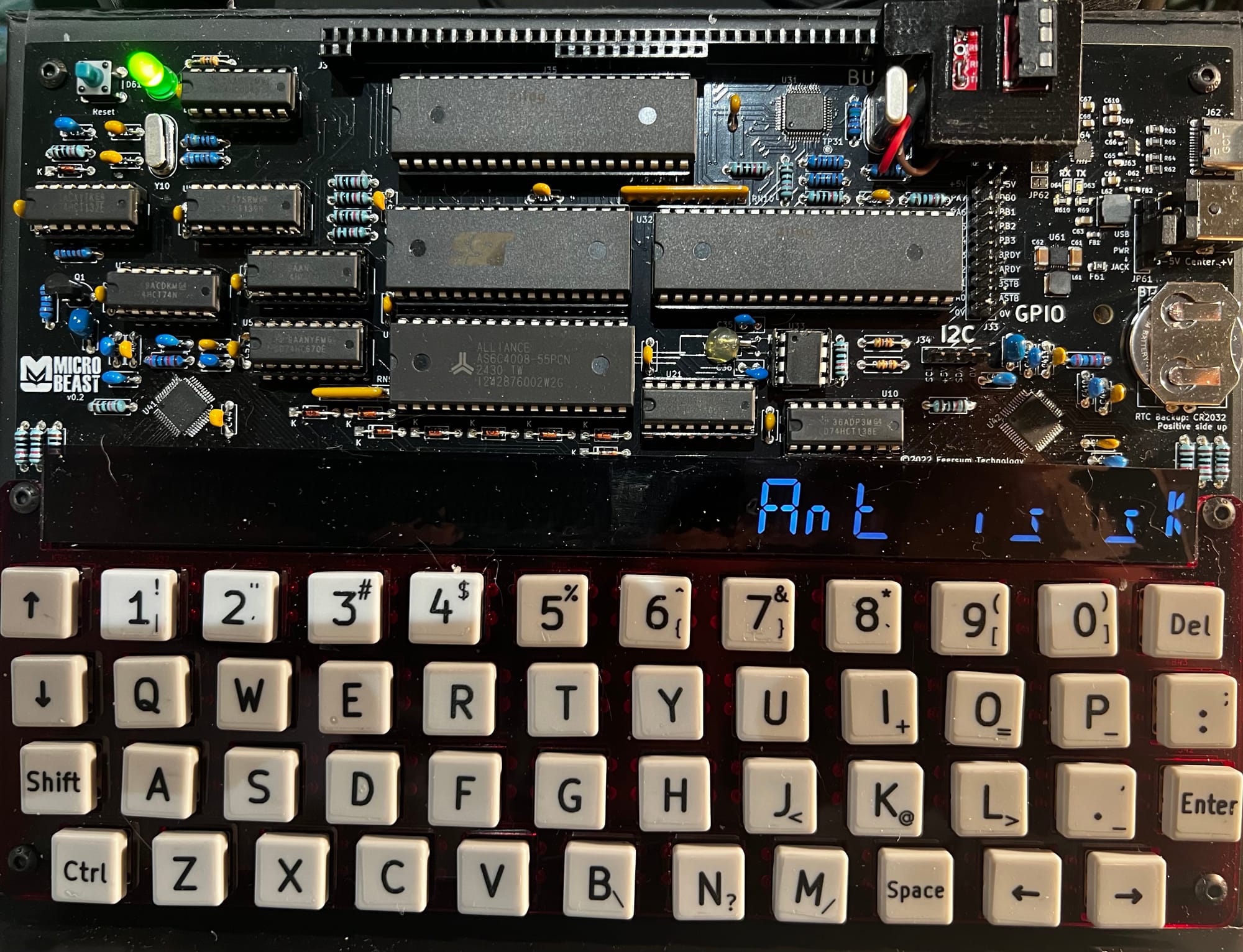
One thing you'll notice straight away is that it is monumentally slow. There's not even an artificial delay loop in there that we can tweak - this is running at full tilt! The sad truth is that while high-level languages like BASIC are great for learning how to code and writing simple programs, they squander a lot of the machine's power turning those fancy BASIC statements into machine code that the processor can execute.
To get more performance out of the processor (and believe me, it can go a lot faster!) we'll have to put aside BASIC, and like the bedroom-based game developers of yore teach ourselves z80 assembler..
Things you can try
- Can you see any way to make the BASIC code quicker?
- Try making the brightness wave go in the opposite direction!
- It's not possible for the eye to actually discern 256 levels of brightness: how can you adjust the sine wave table so that the effect is more striking?
End of Part Six
That's it for Part Six, and also for BBC Basic!
In the next part Your name in lights! (Part 7) we'll learn some z80 assembler, by re-implementing the programs we've already written.
If you're not quite ready for that yet and want to experiment a bit further in BASIC then by all means do so: experimentation is the best way to learn!
If you want to dabble in other high-level languages you are spoilt for choice...there are CP/M implementations of Algol, COBOL, Fortran, Pascal, LISP, Forth, and C, and probably many more besides. These are easily found on the web, and most will run on the 'Beast without issue (just make sure it's the z80 + cp/m 2.2 version you're trying to run.
Well done for making it this far - the real fun is about to begin!
Comments