Your name in lights! (Part 4) (BBC BASIC)


Last time, in Your name in lights! (Part 3) we really got into our stride and managed to write short (very short!) messages of our choosing to the LED display.
We're going to be building on that foundation here, so if you skipped earlier parts or are still a little shaky on the fundamentals you might want to go back and read them again.
To move forward, I'm going to assume that you've got SLIDE.COM on the B: drive of your 'Beast, and that you have the corresponding PC utility installed somewhere in your PATH on your development PC. Refer to the SLIDE README if you need more help with that.
I'm also going to asssume that you have BBCBASIC.COM on your B drive.
Set up
First things first: clone the Beast User repository on to your development PC.
We're going to start in the scrolltext/bbc_basic/strings folder.
Background info
This time, we'll modify the code we already have slightly to allow us to display longer messages, and to let us input the string we want to display dynamically, rather than hard-coding it into the source code.
Here's the code we'll be running this time:
10 REM === MicroBeast LED Demo - Step 3: String Display (BBC BASIC) ===
20 REM Prompt the user for a string and display it on the 24-char
30 REM LED display. Each character is converted to its 14-segment
40 REM bitmask via a font lookup.
50 REM
60 REM --- Load font data into an array (ASCII 32-126) ---
70 DIM font%(94)
80 FOR idx% = 0 TO 94 : READ font%(idx%) : NEXT
90 REM
100 REM --- Get user input ---
110 INPUT "Enter text (max 24 chars): " text$
120 IF LEN(text$) > 24 THEN text$ = LEFT$(text$, 24)
130 REM
140 REM --- Display the string, padding the rest with blanks ---
150 FOR col% = 0 TO 23
160   IF col% < LEN(text$) THEN ch% = ASC(MID$(text$, col%+1, 1)) - 32 ELSE ch% = 0
170   IF ch% < 0 OR ch% > 94 THEN ch% = 0
180   PROCled(font%(ch%), col%)
190 NEXT
200 PRINT "Done!"
210 END
220 REM
230 REM --- Write bitmask bm% to LED column col% via MBB_WRITE_LED ---
240 DEF PROCled(bm%, col%)
250 A% = col%
260 L% = bm% MOD 256
270 H% = bm% DIV 256
280 CALL &FDD6
290 ENDPROC
300 REM
310 REM --- Font DATA (ASCII 32-126, 95 entries) ---
320 DATA &0000, &4900, &0202, &12CE, &12ED, &2DE4
330 DATA &0B59, &0200, &0C00, &2100, &3FC0, &12C0
340 DATA &2000, &00C0, &4000, &2400
350 DATA &243F, &0406, &00DB, &008F, &00E6, &0869
360 DATA &00FD, &1401, &00FF, &00EF, &0040, &2200
370 DATA &0C40, &00C8, &2180, &5083
380 DATA &02BB, &00F7, &128F, &0039, &120F, &0079
390 DATA &0071, &00BD, &00F6, &1209, &001E, &0C70
400 DATA &0038, &0536, &0936, &003F
410 DATA &00F3, &083F, &08F3, &00ED, &1201, &003E
420 DATA &2430, &2836, &2D00, &00EE, &2409
430 DATA &0039, &0900, &000F, &2800, &0008
440 DATA &0100, &208C, &0878, &00D8, &208E, &2058
450 DATA &14C0, &048E, &1070, &1000, &2210
460 DATA &1E00, &1200, &10D4, &1050, &00DC
470 DATA &0170, &0486, &0050, &0888, &0078
480 DATA &001C, &2010, &2814, &2D00, &028E
490 DATA &2048, &2149, &1200, &0C89, &24C0
Much of this code should look familiar from last time. We've got the same machine-code stub to call our BIOS routine in lines 240-290, the same font table setup in lines 70-80, and the same (ish) character display routine in lines 150-190.
We've added some code in lines 110-120 to prompt the user for the string to be displayed:
110 INPUT "Enter text (max 24 chars): " text$
120 IF LEN(text$) > 24 THEN text$ = LEFT$(text$, 24)
INPUT is the keyword that causes the prompt to be displayed, and whatever characters you provide are stored in the variable text$ (remember that $ means "string" here).
The second line is a safety check to ensure that our string is no longer than 24 characters, because that's the maximum message size we can display on our 24-character LED display.
There's also some extra chicanery in lines 160-170 that I glossed over earlier that we should now review:
160   IF col% < LEN(text$) THEN ch% = ASC(MID$(text$, col%+1, 1)) - 32 ELSE ch% = 0
170   IF ch% < 0 OR ch% > 94 THEN ch% = 0
col% is our integer "column number" variable counting up from 0 to 23 inclusive. For each column position we extract the relevant character from the string - that's the MID$ keyword in the middle. We use ASC to get the ASCII character code for this character, and we subtract 32 from it, because we don't have font table entries for the first 32 ASCII characters as they're all control codes anyway. The first entry in our font table is the SPACE character, whose ASCII value is 32: so subtracting 32 is an easy way to convert from ASCII code to font-table index.
Line 160 is also guarding against our input string being shorter than the display width (IF col% < LEN(text$)) - if we run out of characters in text$ before we get to the end of the display we do ELSE ch% = 0 which has the effect of using entry 0 in our font table (a blank SPACE character).
Finally line 170 guards against tricksy character values that our outside the bounds of our font table: if that happens, we'll swap those out for a SPACE character too.
Running the code
You know the drill:
- Boot your 'Beast
- SLIDE the
STRINGS.BBCfile from the repo across to your 'Beast's B drive - "log in" to the A drive with
A: - start BBC Basic with
BBCBASIC - type
LOAD "STRINGS" - inspect it with
LIST - run it with
RUN
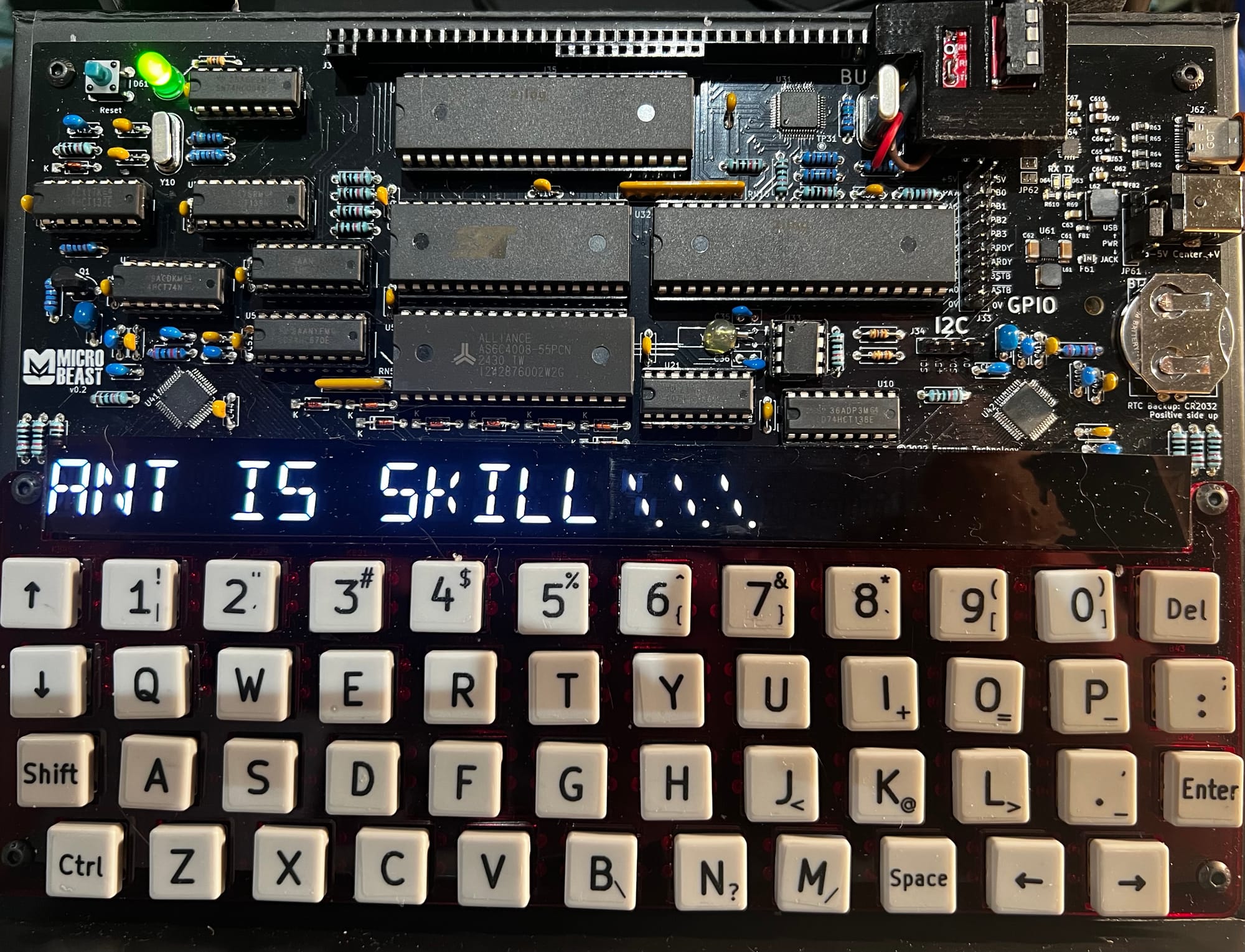
All being well, you should see this (your string might be different):
Things you can try
- Try displaying a string that's longer than the display
- Try displaying characters that aren't in the font table
- How could you adapt the code to display "User Defined Graphics" (UDGs) ? Are there are characters you can swap out in the existing font table?
- What about if you wanted to extend the existing font table to offer UDGs?
End of Part Four
That's it for Part Four - another relatively short one. Next time, in Your name in lights! (Part 5) we'll look at how we can display strings that are longer than the available display width, and introduce the ancient and venerable art of ScrollTexts...
Comments