Build a traffic light! (Part 2)


In Part One we focused on the hardware for our traffic light project: this time around, we're going to be looking at the software. I'll start with a simple BASIC version, and then we'll look at some other options in later posts.
BBC BASIC
The BASIC of choice for this sort of work is BBC BASIC. If you're used to MS BASIC, trust me this is a vast improvement. You can use it to write readable, structured code.
There is a stock Z80 BBC BASIC available from bbcbasic.co.uk, but it's of limited use for this project: you'll be able to turn the LEDs off and on fine, but none of the timing related stuff will work.
For that, we need the specific MicroBeast port of BBC BASIC - download it and install it on your B drive. If you need help with how to do that, see our BeasTTY guide. Remember to A:WRITE to save your RAM disk to flash for next time!
Once you've got Beast BASIC installed, give it a quick test to make sure we're running the right thing: change to your B drive (B:) start BBC BASIC (BBCBASIC) and at the prompt type P.TIME then wait a second and type P.TIME again.
Each P.TIME should print a number. The numbers should be different, and the second one should be greater than the first one, like so:
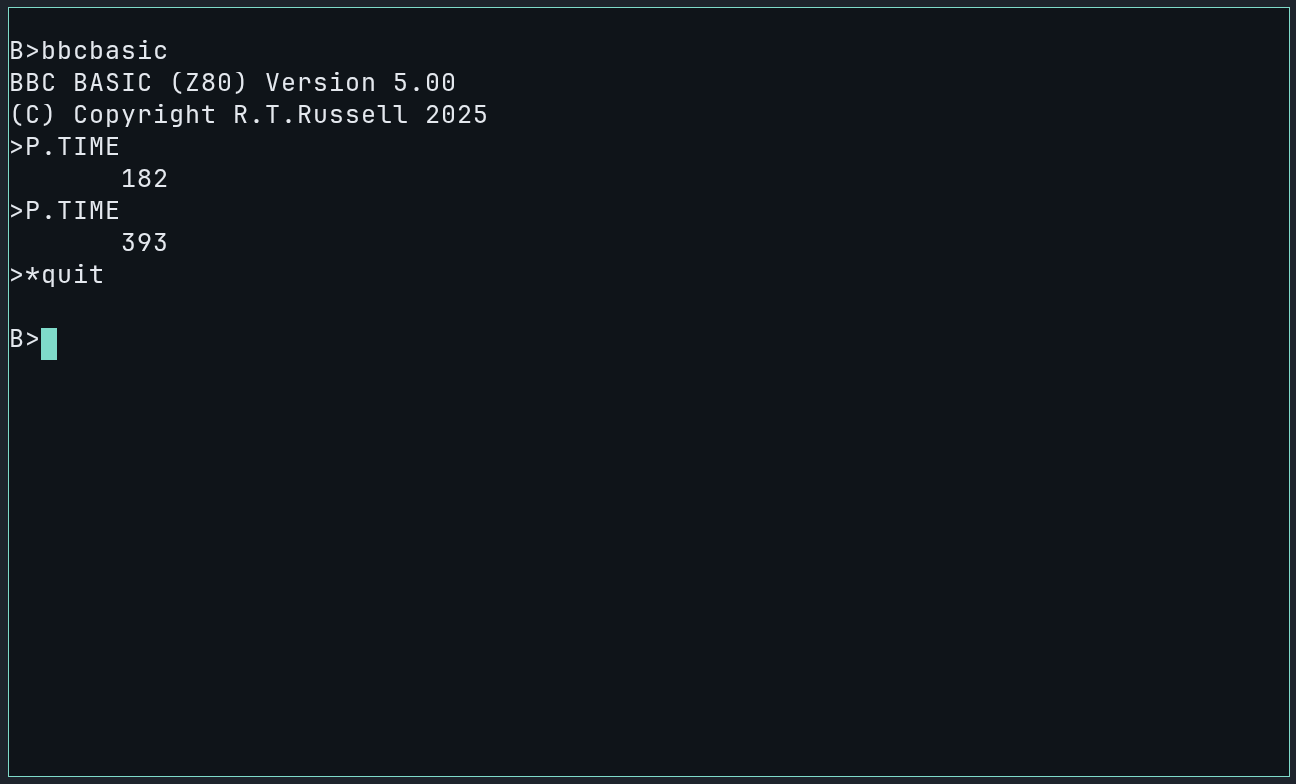
If you've got two values the same, or they're going backwards, you've probably got the wrong version - double check that you have the one from the link above.
I/O in BBC BASIC
To make our traffic light work, we need to first setup the PIO Port B, and then write values to light the appropriate LEDs. To do this we need to write values to the PIO Port A registers. In a MicroBeast, the IO port addresses for these registers are:
PIO_A_CONTROL_PORT: 0x12
PIO_A_DATA_PORT:    0x10
Setting up the port
To setup Port A, we need to do three things:
- configure the port to work in mode 3 (individual bit control)
- tell it which pins are going to be outputs (PA0, PA1, and PA2) and which will be unused/inputs (PA3, PA4, PA5, PA6, PA7)
- disable interrupt generation for this port (we're not using interrupts)
To do that, we write specific values to the Port A control register, in the following sequence:
write(port_a_control_register, 0xcf); // set mode 3
write(port_a_control_register, 0xf8); // set A[2:0] as outputs, rest inputs
write(port_a_control_register, 0x03); // disable interrupts
Here's a snippet of code to do that in BBC BASIC:
10 port_a_ctrl% = &12
20
100 DEF PROCsetup
110 PUT port_a_ctrl%, &CF: REM mode 3
120 PUT port_a_ctrl%, &F8: REM B[2:0] are outputs
130 PUT port_a_ctrl%, &03: REM disable irqs
140 ENDPROC
We can now call PROCsetup from our program or from the BASIC prompt to configure the port.
Controlling LEDs
To control LEDs, we control the port A data bits PA0 (red), PA1 (amber), and PA2 (green). If you recall, we wired these "upside down", so we need to drive a line LOW (set the corresponding port A bit to zero) in order to light the attached LED.
This is a bit non-intuitive, so we can compensate for it in the code:
20 port_a_data% = &10
30
200 DEF PROClight(l%)
210 PUT port_a_data%, (NOT l%) AND &FF
220 ENDPROC
PUT is BBC BASIC's way of writing to an IO port: it takes two parameters, the first is the port address and the second is the value you want to write to it. The NOT l% expression in line 210 basically flips all the 1s to 0s and vice versa in the variable l%, and the AND &FF makes sure that we only use the lower 8 bits of this value. Now we can PROClight(1) and expect the Red LED to turn on, we don't have to worry about inverting values any more. Go ahead and give it a try! You can type e.g. PROClight(1) or PROClight(2) from the BBC BASIC prompt. See if you can figure out the other useful values to pass to this procedure. Don't forget to run PROCsetup first.
Timing
Traffic light timing is mandated by the Department of Transport. The document is interesting, if baffling. My interpretation of the timings is:
| Phase | Duration (secs) |
|---|---|
| Red | minimum of 3 |
| Red+Amber | 2 |
| Green | minum of 7 |
| Amber | 3 |
We can write a procedure in BASIC to delay for a given number of seconds:
400 DEF PROCdelay(secs%)
410 secs% = secs% * 100 + TIME
420 REPEAT UNTIL TIME > secs%
430 ENDPROC
Once again you can test this from the BASIC prompt. Type PROCdelay(5) and observe that there's a pause of 5 seconds before control is returned to you.
TIME in centiseconds, or 1/100ths of a second. This is the reason for the secs% * 100 in line 410 above, to convert our given interval in seconds to an interval in centiseconds.Here's the complete program for running our LED sequence:
10 port_a_ctrl% = &12
20 port_a_data% = &10
30 red% = 1: REM bit 0
40 amber% = 2: REM bit 1
50 green% = 4: REM bit 2
60 red_amber% = red% OR amber%
70 all% = red% OR amber% OR green%
80 off% = 0
90
91 PROCmain
92 END
100 DEF PROCsetup
110 PUT port_a_ctrl%, &CF: REM mode 3
120 PUT port_a_ctrl%, &F8: REM B[2:0] are outputs
130 PUT port_a_ctrl%, &03: REM disable irqs
140 ENDPROC
150
200 DEF PROClight(l%)
210 PUT port_a_data%, (NOT l%) AND &FF
220 ENDPROC
230
300 DEF PROCred: PROClight(red%): ENDPROC
310 DEF PROCamber: PROClight(amber%): ENDPROC
320 DEF PROCred_amber: PROClight(red_amber%): ENDPROC
330 DEF PROCgreen: PROClight(green%): ENDPROC
340 DEF PROCoff: PROClight(off%): ENDPROC
350 DEF PROClamp_test: PROClight(all%): ENDPROC
360
400 DEF PROCdelay(secs%)
410 secs% = secs% * 100 + TIME
420 REPEAT UNTIL TIME > secs%
430 ENDPROC
440
500 DEF PROCmain
510 PROCsetup
511 PRINT "Lamp test..."
520 PROClamp_test
530 PROCdelay(5)
531 PRINT "Lights out..."
540 PROCoff
550 PROCdelay(2)
560 REPEAT
570   PROCred
580   PROCdelay(3)
590   PROCred_amber
600   PROCdelay(2)
610   PROCgreen
620   PROCdelay(7)
630   PROCamber
640   PROCdelay(3)
660 UNTIL FALSE
670 ENDPROC
Type that in (or paste it into BeasTTY), and save it to your B drive with SAVE "TRAFFIC". Then execute it with RUN and you should see results like this:
Hit the ESCAPE key at any point to break out of the program, and you can get out of BBC BASIC by typing *QUIT - and once you've done that remember to A:WRITE to save your RAM disk to flash again, so that you don't lose your program.
In part 3, we'll write the same program again, but this time in z80 assembler, just for fun.
Comments