Binary and hexadecimal basics
If binary and hexadecimal is just so much gobbledegook to you, try this basic primer.


If binary and hexadecimal seem like so much impenetrable computer gobbledegook to you, then I've got good news for you: if you can count in base 10 (you know, regular every day counting, possibly on your fingers) then you can count in base 2 (binary) and base 16 (hexadecimal). You already have the mental machinery, you just need to use it slightly differently. It's literally a radical shift in your thinking!
Plain old numbers
Let's start with the numbers 0-9. We can use these to count things. There are ten numbers, and this is no accident: you have 10 fingers, and fingers are convenient for counting things.
Once you want to count past 10 things though, you have a bit of a problem: insufficient digits, in both senses of the word. What you need is a system to represent that you already counted ten things, and are now starting over.
Perhaps you could ask a friend to keep their own count, which is the number of times your count went past 9. Of course, they'll run out of digits soon too, so they could enlist a friend of their own to provide the same service, and now between you you can count up to 999 things! Remarkable!
Ancient civilisations quickly realised that this approach was somewhat labour intensive, so counting buddies were quickly replaced by clay tablets, abacuses, marks on sticks, and inky daubings on bits of paper.
You may remember being taught in primary school, that a number like 769 is "nine in the ones column, 6 in the tens column, and 7 in the hundreds column". If we need to extend this to more digits, we just keep adding columns on the left. Let's extend it to a much bigger number:
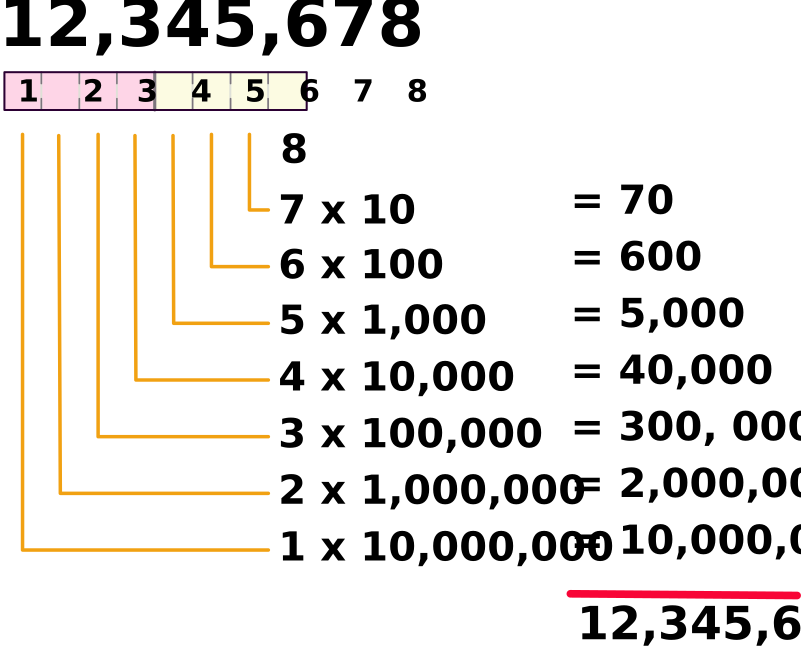
It's an 8 in the ones column, a 7 in the tens column, ...., a 2 in the millions column, and a 1 in the ten-millions column. Add all those up, and we get the number we started with.
Every column represents a range of numbers 0-9 that is ten times the size of the column to its right.
Those big numbers like millions and ten millions quickly get quite tedious to write down and reason about. We can use exponential notation instead to represent them more compactly:
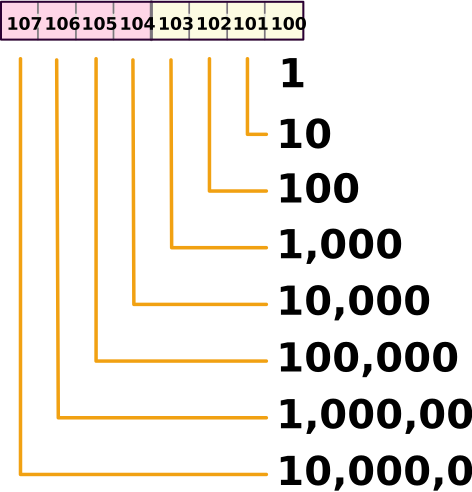
The little floaty superscripted number is the exponent, and it represents how many times we're going to write down the attached number before multiplying them all together. So 10 with a little two above it means "two tens, multiplied together, equals 100".
This is often called (rather dramatically) "ten raised to the second power". And by convention anything "raised to the zero-th power" is 1.
So there we have it: probably the most you've thought about the actual mechanics of counting since you were small. If you're comfortable with what we've discussed so far, I have a little brain-teaser for you:
What if we change the tens in our tally columns for a different number, like 2?
All your base are belong to us
Now we'd be dealing with something like this:
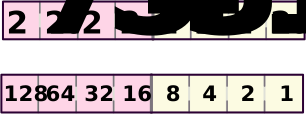
The rightmost column is "two raised to the power of zero" and as we've learned that always means 1. So we have a "ones" column, just like before.
Moving left one column, we now have "two raised to the power of one", or a single solitary 2. So this is a "twos" column. This represents the number of times we counted to two in the rightmost column.
That's right: two, not ten. We can't put the numbers "3" to "9" in our "ones" column any more, because they're all bigger than two, and that's what the columns stretching leftwards are for: counting things bigger than 2.
For the same reason, there are no single digits in everyday use that represent a number greater than ten, because we use our "tens" column to represent those numbers.
So when we swapped tens for twos, we moved from base 10 ("decimal" or "denary") to base 2 ("binary").
Perhaps the most comfortable way to visualise this is to remove all but two of your fingers using some rusty secateurs[1]. You'll need to do the same for all your counting buddies too, of course[2]. Maybe do them first, as secateurs are going to be hard to manage with only two fingers.[3]
But wait! There is an easier way! Instead of using one finger to represent "0" and the other to represent "1", we could use a curled finger to represent zero and an extended finger to represent one! Then we can use one finger for our "ones" column, and another finger for our "twos" column. And with a full complement of fingers we can use a third for our "fours" column and so on.
You'll now be amazed to discover that you can count up to 1023 in binary on your fingers (assuming you still possess them).
This is more or less what computers do. They are (mostly) electrical in nature, and use various voltages to represent different things. If your computer runs from a 5 volt power supply, it can represent a "one" by "any voltage that's more than about 2.5 volts" and a "zero" by "any voltage that's less than about 2.5 volts". It can very easily store one of these states in a "bit", and string 8 of these bits together to make a "byte": just like your counting buddies from our first thought experiment. The first bit is "two raised to the zeroth power (1)", the second bit is "two raised to the first power (2)" and so on.
Old-timey computer CPUs like the z80 and 6502 stopped at 8 bits, therefore they can represent 256 different values in a single byte. That's the values 0 through 255, or 0 to (28)-1 - we don't have that 9th bit (28) so we have to stop counting just before we get to it.
Of course, they can count higher by slinging multiple bytes together: that's the equivalent of adding more counting columns, 8 at a time. But their basic intrinsic unit is the byte.
This is why your basic z80 registers H, L, D, E, B, C etc are 8-bit registers, they can hold values between 0 and 255, and the "gestalt" registers HL, BC and DE use two of these bytes to represent values up to 65535.
Let's now imagine that we're going to present 8 voltage levels simultaneously to a z80 8-bit CPU. We'll alternate the signals between 5 volts (which we'll call "HIGH" or "H") and 0 volts (which we'll call "LOW" or "L"). So our sequence is "HLHLHLHL". CPUs see a "H" as a 1, and a "L" as a 0, so to a CPU this represents the binary value 10101010:
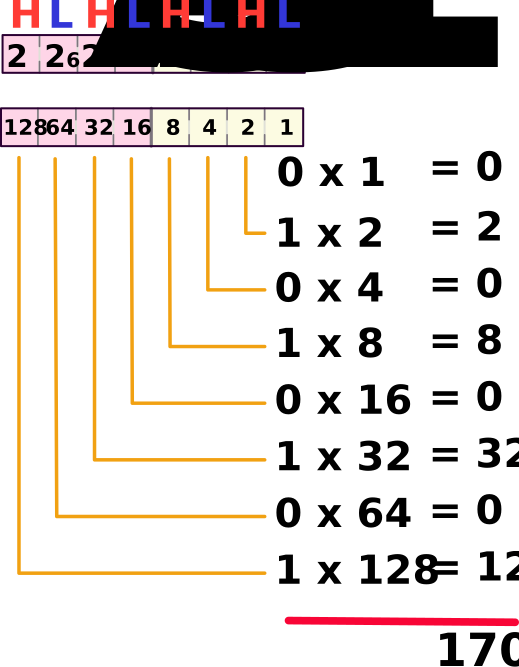
See how the maths is much easier? We only ever have to multiply by zero or one, or in other words, we only have to write down the place value itself, or zero. If we add up all those results we find that our set of voltages represents the number 170.
One last thought before we move on: you might find that you can easily deal with 1, 2, 4 and 8 in your head, but things get trickier as you venture into 16, 32, 64, 128 territory. Don't worry, there's a trick. We can split the byte into two "nybbles" (or sometimes "nibbles") of 4 bits each - a "high" nybble (that I've been colour-ciding pink in the diagrams) and a "low" nybble (that I've been colour-coding yellow in the diagrams). First work out the high nybble, and multiply it by 16. Then add the value for the low nybble.
So in the example above, each nybble is "HLHL" or "1010", so each nybble has the value 1x8 + 0x4 + 1x2 + 0x1 = 8+2 = 10. Multiply the high nybble (10) by 16 to get 160. Add the low nybble (also 10) to get 170.
There's an even easier cheat if we convert into hexadecimal instead of decimal, but for that we need to learn hexadecimal.
Why is 175 the most hexadecimal number?
Instead of changing our number base (or "radix") from 10 to 2, we could change it to 16. This is hexadecimal. Before when we went down from 10 to 2 digits we had to say goodbye to 3, 4, 5, 6, 7, 8 and 9. This time though, we're increasing the radix above ten, so we're going to need some extra digits to represent the single values 10, 11, 12, 13, 14 and 15. Convention dictates that we use the letters 'A' to 'F' for this, so 'A' is 10, 'B' is 11, 'C' is 12, 'D' is 13, 'E' is 14 and 'F' is 15.
Another convention is to use a prefix or a suffix to indicate that this is hex number, not a word or any other kind of code. Common prefixes are $, & and 0x, and suffixes are generally H or h. So 0x10, $10, &10 and 10h and 10H all represent the same number.
Now our place values look like this:
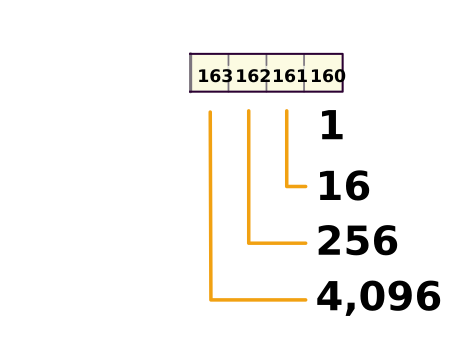
I stopped at 4 hex digits, as that already represents quite a large array of number values (0 up to 65,535 or $0000 up to $FFFF). 8-bit CPUs like the z80 have 8-bit internal registers, but they have 16-bit address busses, so now you can probably see why the maximum amount of memory on these computers is usually 64 K (64 * 1024 = 65536 bytes, addresses $0000 up to $FFFF).
Finally back to the easier cheat that I promised you. Notice that a single hexadecimal digit can represent the decimal values 0 to 15. This is the same range of values as a nybble when we were looking at binary. So a group of 4 binary digits corresponds to a single hexadecimal digit; thus you can easily convert quite large binary values into compact hexadecimal notation very easily in your head by working nybble-by-nybble:
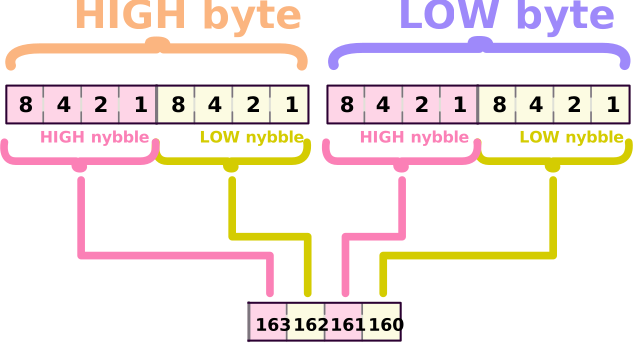
For example the binary value 1011 1110 1110 1111 can be read in groups of 4 bits and converted on the fly to hex digits B, E, E, and F, so the resulting value is BEEFh. This is why hex is popular with programmers.
And to answer the question posed in this section's heading: it's because 175 is hex AF 😜
Comments