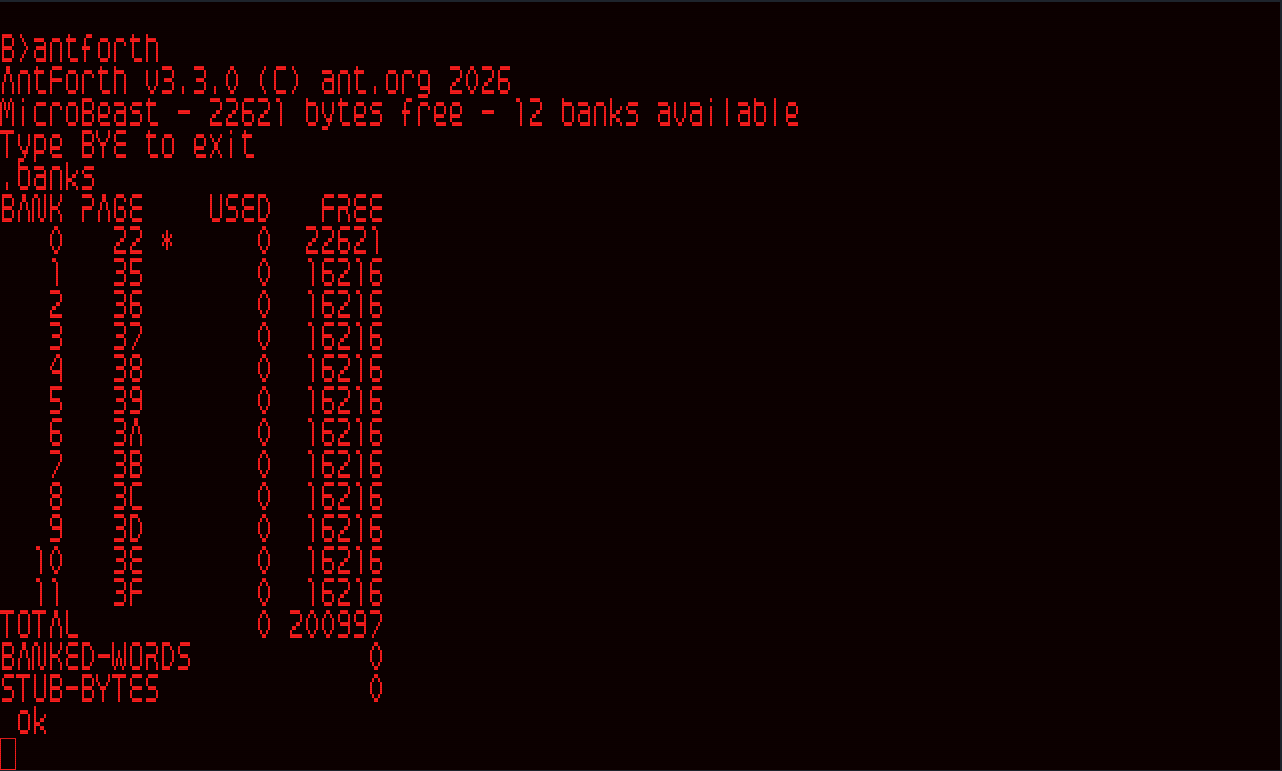
Twelve new words, stack-underflow checks on every word that takes arguments,
and fixes for banked memory. Tested on real MicroBeast hardware.
New words
Stack
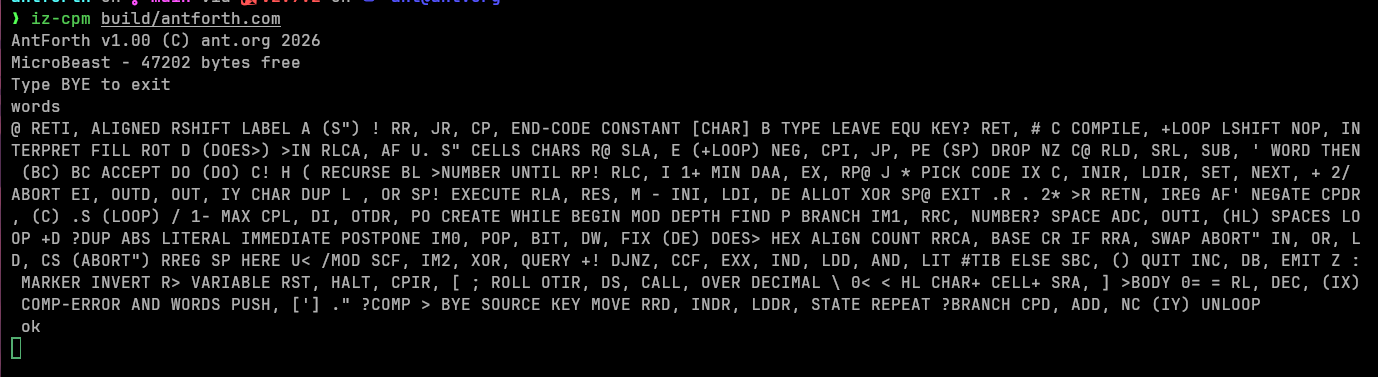
NIP ( a b -- b ), TUCK ( a b -- b a b ) (Core Extensions)
-ROT ( a b c -- c a b ), the reverse of ROT (antforth extension)
? ( addr -- ) prints the value stored at an address, the same as @ . (Tools)
Comparisons
<>, 0<>, 0>, U> (Core Extensions)
<=, >=, signed (antforth extensions)
Loops
BEGIN … AGAIN for loops that never end on their own, such as task bodies
and event loops. Leave with EXIT.
?DO runs zero times when the limit equals the start (DO would run 65,536
times). It works with LOOP, +LOOP, LEAVE, UNLOOP, I and J.
Core Extensions coverage goes from 15 to 23 of the 46 words.
Stack underflow is caught everywhere
Every kernel word and assembler mnemonic that takes stack arguments now raises -4 stack underflow when they're missing. The check runs before the word
changes anything. Before, DUP, 0=, 1+, TYPE, FILL, MOVE, ACTIVATE and about 45 others silently worked on whatever was left in a
register.
PICK and ROLL check that the stack holds u items.
SET-ORDER and RESTORE-INPUT count their arguments correctly.
An assembler instruction missing an operand raises -4 before it writes any
code bytes, so a caught error leaves HERE where it was.
Fixes
>NUMBER swapped the two halves of its starting value. With a nonzero
start, 1 0 S" 0" >NUMBER 2DROP D. printed 655360 instead of 10.
Starting from 0 0, as most code does, wasn't affected.
Banked words could hide or hang kernel words. Giving +BANK the same
physical page twice made two banks share one piece of RAM, so defining words
in one bank overwrote dictionary entries in the other. A lookup could then
miss CR or BANK!, or hang. +BANK now refuses a page that is already
listed (dup?, error -2), and so does the boot page list.
Parsing near the top of a bank could write into fixed RAM. When a bank
above 0 was nearly full, the parse buffer and PAD ran past $C000 and
overwrote bank 0's dictionary. Banks above 0 now end at $BF58, so .BANKS
shows 16,216 bytes free per bank instead of 16,384.
WORD refuses words over 128 characters with error -18, so even EVALUATE can't overflow the parse buffer.
Things to know when upgrading
Room for only two tasks. Every task's control block (TCB) must sit below $8000, and this kernel leaves room for two named tasks
(TASK CONSTANT name), with 25 bytes to spare. A third TASK raises -8.
Create your tasks before anything else. TRAFFIC.FTH now does this, so LIGHTS is task 1. To see the free room, type DECIMAL 32768 HERE - . at a
fresh prompt. See "How many tasks fit" in docs/phase6-multitasker.md.
Scripts that add the same page twice ($22 +BANK $22 +BANK) now fail.
Use a different page for each bank.
The underflow checks cost some speed: INCLUDE is about 10–14% slower in
CPU cycles. Disk I/O is unchanged, so the real-world difference is smaller.
Banked code must leave 168 bytes below $C000. Code that filled a bank to
the brim before now raises -8 sooner.
Size
antforth.com is 31,395 bytes, 641 more than v3.2.1.
antforth
AntForth 3.3.0 released
I made a new release of AntForth, because there are a couple of words I need for another project. There were a few digressions and bugfixes along the way!
Get it here.
Release notes:
antforth v3.3.0
Twelve new words, stack-underflow checks on every word that takes arguments,
and
I had a cunning idea about how to utilise all the available memory of the MicroBeast from AntForth. It was quite a simple concept, that I thought would take a few days. It ended up taking a few weeks of solid LLM coding! I'll let Paige, the BMAD technical author agent tell it in her own words...
A Z80 can only see 64 KB at once. The MicroBeast retro computer has 512 KB of RAM. Phase 4 of AntForth was about closing that gap: letting a single Forth session compile words into, and call words across, banks of memory that don't all fit in the processor's address space at the same time.
This post is the story of that phase. It ships as antforth v3.0.7, the first feature release since v2.0. I'll lead with the architecture and the things that went wrong (there were a few good ones), and weave in how we used BMAD — an agentic, spec-driven development method — to orchestrate the whole thing without losing the thread.
If you write Forth or Z80 machine code, there are deeper sidebars for you. If you're here for the "how do you actually build something complex with AI agents" angle, the connective tissue is the BMAD loop, and you can skip the hex.
The idea: a window, not a map
The naive way to use more memory is a flat map — every byte has one address. That's impossible here: 512 KB doesn't fit in 16 bits.
The MicroBeast's MMU solves this the classic 8-bit way. The Z80's 64 KB is divided into four 16 KB slots. Each slot displays one 16 KB page chosen from a 6-bit page space (64 pages × 16 KB = 1 MB of addressable pages, of which 512 KB is real RAM). Change a slot's page register and the same Z80 addresses now read and write different physical memory.
flowchart LR
subgraph Z80["Z80 address space (64 KB)"]
S0["Slot 0 $0000-$3FFF kernel (fixed)"]
S1["Slot 1 $4000-$7FFF kernel (fixed)"]
S2["Slot 2 $8000-$BFFF THE WINDOW"]
S3["Slot 3 $C000-$FFFF stacks/CCP/BDOS/BIOS"]
end
S2 -.maps one of.-> B0["page 0x22 = bank 0"]
S2 -.maps one of.-> B5["page 0x39 = bank 5"]
S2 -.maps one of.-> BN["...up to 29 banks"]
Three slots stay nailed down: the kernel lives in slots 0 and 1, and the stacks, the CP/M residency, BDOS and BIOS live in slot 3. Slot 2 ($8000–$BFFF) is the window. Banking is, fundamentally, the discipline of deciding which page is in the window right now, and making the Forth dictionary behave sanely as that page changes underneath it.
The default configuration gives you 12 banks (192 KB). Sacrifice the virtual console and the RAM disk and you can push to a theoretical 29 banks (464 KB) — all surfaced to the user through one word, BANK!.
5 BANK!        \ map page for bank 5 into the window
: GREET ." hi from bank 5" ;
0 BANK!        \ back to bank 0
GREET          \ still works — prints "hi from bank 5"
That last line is the whole problem in miniature. When you type GREET from bank 0, its code isn't currently mapped in. Something has to notice, swap bank 5 into the window, run it, and swap back — without the user ever knowing. How we got there is the rest of this story.
The architecture: a portal, a triple, and a pile of stubs
Reclaiming memory nobody was using
Banking needs bookkeeping memory that's always visible regardless of which bank is in the window. Phase 4's first real decision (Epic 16) was where to put it. The answer, verified on real hardware: evict the CP/M CCP.
The CCP — the command-line shell — sits at $D400–$DBFF and is reloaded from disk on every warm boot anyway. That's 2 KB of fixed memory we could take for free. Story 16.1 confirmed on silicon that consuming it is safe (warm-boot reloads it), which unlocked everything downstream.
flowchart TD
subgraph Fixed["Fixed memory (always mapped, slot 3)"]
BT["bank-table[] $D400, 29 x 6 bytes"]
AP["active-pages[] $D4AE, 29 bytes"]
ST["descriptor-stub allocator $D4CB-$DBFF = 1845 B = 461 stubs"]
end
subgraph Window["Slot-2 window ($8000-$BFFF)"]
BANK["whichever bank is mapped now"]
end
BT -.tracks per-bank state for.-> BANK
ST -.routes cross-bank calls into.-> BANK
```
The per-bank "triple" — and the one thing it deliberately leaves out
Each bank has its own dictionary growing inside the window. So each bank needs its own copy of three Forth pointers:
HERE — where the next compiled byte goes
LATEST — the most recently defined word
the wordlist head — the start of the search chain
We call this the triple. On BANK!, antforth saves the live triple into bank-table[old] and loads bank-table[new]. Standard stuff.
Sidebar — the invariant that saved us repeatedly. The triple is only those three pointers. The hash bucket array that FIND walks is global and shared — it is not swapped per bank. This sounds like a bug waiting to happen, and reviewers kept "finding" it. It's actually the load-bearing correctness property of the whole design: because the buckets are shared and FIND's page-in is address-conditioned (any address below $8000 is fixed memory, so it's reachable without paging), a word linked into the chain stays findable from every bank. Swaps move the triple; they never touch findability. Internalising this turned a class of scary-looking "triple corruption" review findings into empirically-refutable non-issues — more on that below.
Calling across the gap: descriptor stubs
When you define a word in bank 5, you can't just store its address — that address ($8000-something) means a different physical location depending on what's in the window. So every banked word gets a 4-byte descriptor stub in fixed memory. The stub records "I live in bank 5 at offset X." Executing the word routes through its stub, which maps the right page in, runs the body, and restores the window.
The dictionary pointers that reach these words are 24-bit fat pointers: two bytes of address plus one byte of bank ([addr:2][bank:1]). That one extra byte per link is what lets FIND know whether a hit lives in fixed memory or out in a bank — and it's the single biggest line item in the byte budget (Epic 20, below).
The BMAD loop: how the work actually got made
Here's the connective tissue. antforth isn't built in a freewheeling "chat until it compiles" style. Every increment runs through a structured, auditable loop:
flowchart LR
SP["sprint-status.yaml (source of truth)"] --> CS["create-story (rich, spec'd ACs)"]
CS --> DEV["dev-story (implement + gates)"]
DEV --> CR["adversarial code-review (fresh context, often a different model)"]
CR --> HW["hardware UAT (real MicroBeast)"]
HW --> DONE["status -> done"]
DONE --> RETRO["retrospective (per epic + per phase)"]
RETRO --> SP
A few things make this work at the scale of a 38-story phase:
Stories carry their own context. A create-story pass doesn't just list acceptance criteria — it pre-reads the live source, pins down exact file:line citations, and surfaces findings the dev pass must not re-discover. Several Phase-4 stories opened with five or six "load-bearing findings resolved at draft time." That front-loading is why dev passes land cleanly.
Code review is adversarial and isolated. It runs in a fresh context, frequently on a different model, with an explicit mandate: reviews must find things; an empty review is suspect. This is not ceremony — across Phase 4 it caught a real silent-corruption defect on nearly every pass (a return-stack overflow, an EVALUATE source-id leak, a bucket-scrub bug). The discipline is to refute findings empirically — run the code, watch the pointers — rather than argue.
Hardware is a gate, not an afterthought. Every binary-delta story gets a UAT on a real MicroBeast before it's marked done. Emulators lie (ours modelled a write-only MMU port as readable, which cost us a debugging detour); silicon doesn't.
Retrospectives close the loop. One per epic, one per phase, each checking the previous retro's action items. Phase 4 ran 4-for-4 and 5-for-5 on follow-through in its last two epics — the accountability ledger is the clearest signal the loop is paying rent.
The human (the project lead) stays in the loop at exactly the decision points that matter: mechanism elections, envelope dispositions, tag application. The agents do the reading, drafting, implementing, and reviewing; the human makes the calls that need judgement.
The war stories
No interesting phase is monotonic. Here are the three detours worth remembering.
1. The cross-bank call that wouldn't return cleanly
The first dispatch design (Epic 18) used a sentinel trampoline: a cross-bank call pushed a fake return address that pointed at a little fixed-memory routine, which would restore the window when the word "returned" to it. It worked in the emulator. It was also fragile in a way that took an entire interlude to understand.
The symptom was intermittent hangs. The suspected cause cycled through "kernel too big," "emulator quirk," "trampoline layout." The actual root cause (ADR 19.5) was something else entirely: portal-window dictionary aliasing. When a word's body sat above $8000and a foreign bank was mapped, a dictionary lookup could walk the shared bucket chain through the window and read a foreign page. The trampoline was innocent. The kernel size was never causal.
This earned its own stabilization interlude — Epic 19.5 — rather than being smuggled into a feature epic. That framing decision mattered: the interlude got its own stories, its own retro, and its own release tag (v3.0.4), which is why the whole downstream version mapping shifted by one and Phase 4 ended on v3.0.7 instead of v3.0.6.
2. Replacing the trampoline with nothing
The fix was elegant in the way good 8-bit code often is: make the cost disappear. The sentinel trampoline was replaced by an RST $28 self-dispatching stub. Each banked word's stub is its own dispatcher; the inner interpreter's NEXT doesn't need a discriminator added to it at all.
Sidebar — 0 T-states per NEXT. The headline result (Epic-19.5 DR-2): cross-bank dispatch adds zero cycles to the inner loop. The plain "pop and continue" path is the only path. A BANK! itself costs around 425 T-states (most of it the triple swap and one MMU port write); an intra-bank call costs exactly one extra JP versus a flat build. For a mechanism that lets you address half a megabyte, the steady-state overhead is essentially a rounding error.
3. Stop poking the MMU directly
Midway through, antforth was writing MMU page registers with direct OUT instructions. On real hardware this fought the BIOS, which keeps its own shadow of the page state and re-pages under interrupt. The MMU page ports turned out to be write-only by design — any attempt to read them back floats.
The pivot (the "BIOS-MBB" change) was to stop poking ports and route every page change through two blessed BIOS entry points: MBB_SET_PAGE ($FDDF) and MBB_GET_PAGE ($FDDC). The BIOS keeps the shadow coherent and survives interrupts. This is the kind of correction that only shows up on silicon, and it's the reason the hardware-UAT gate is non-negotiable.
What we ended up with
A Forth where banking is both real and legible. The final epic (Epic 22) added no new mechanism — it made the mechanism observable.
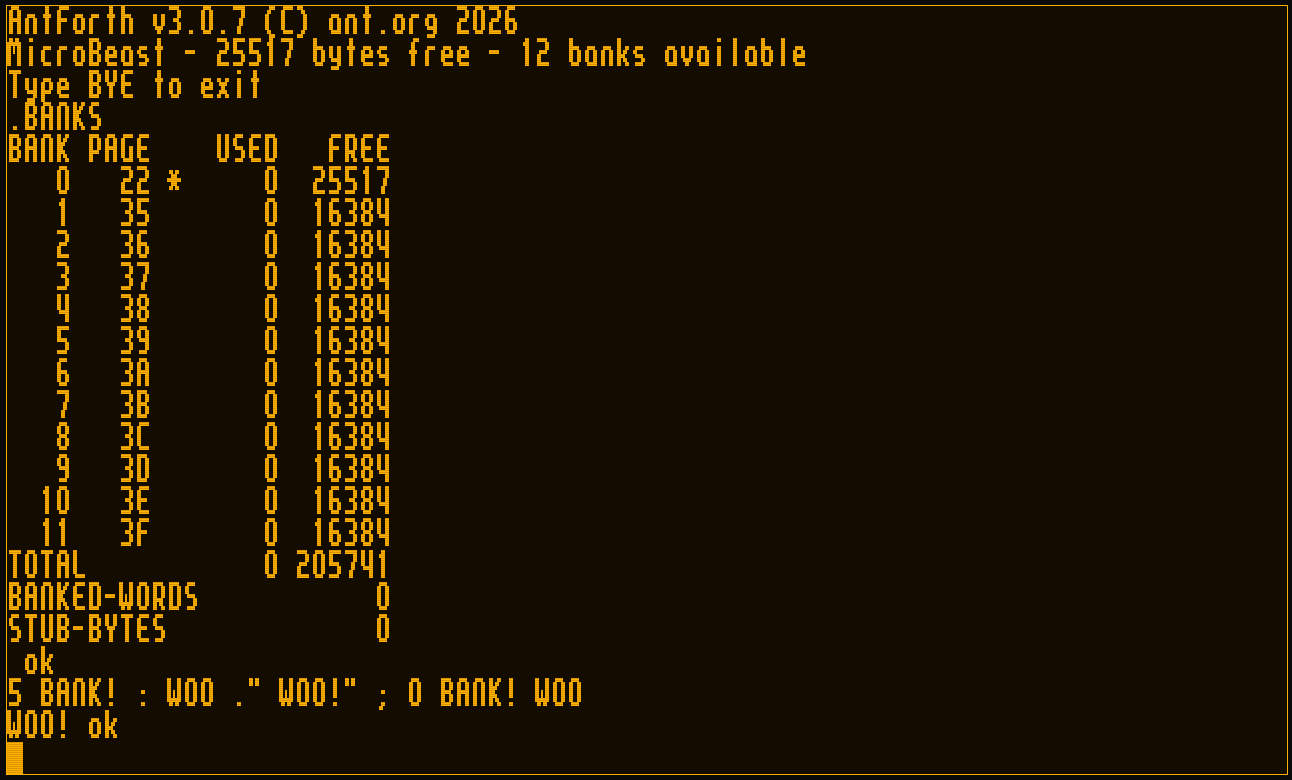
.BANKS
\ BANK PAGE    USED   FREE
\    0  22 *    1843  25685     <- bank 0 = kernel dictionary
\    5  39         0  16384
\  ...
\ TOTAL          1843 205909
\ BANKED-WORDS      0
\ STUB-BYTES        0
The REPL can show which bank you're about to type into (opt-in, so the classic prompt is untouched for everyone else):
-1 PROMPT-SHOW-BANK    \ enable the indicator
5 BANK!
[5] ok                 \ the prompt now tells you where you are
0 BANK!
ok                     \ bank 0 is suppressed — a [0] prompt is just noise
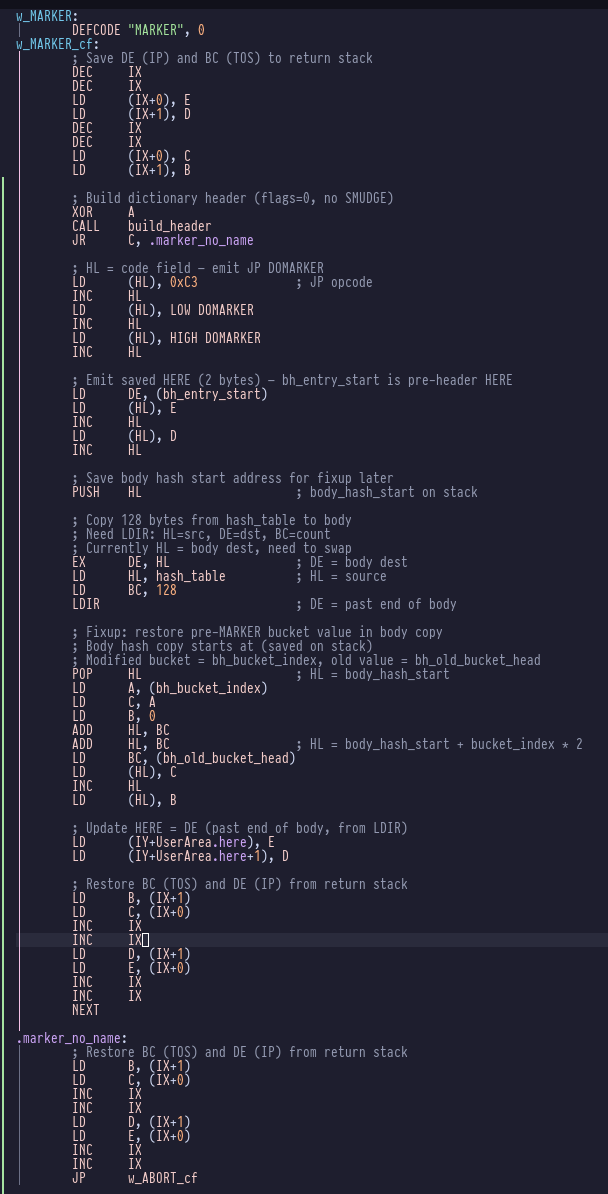
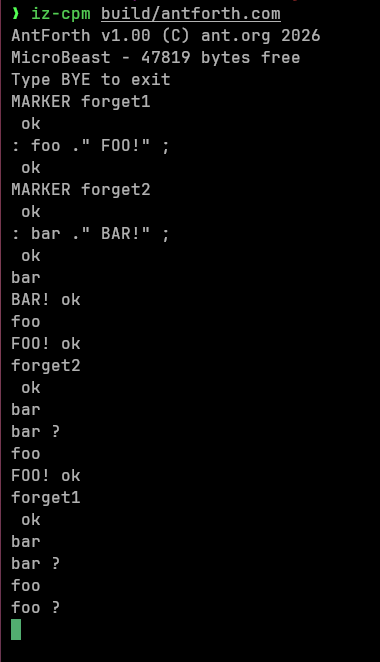
And the cross-bank machinery is end-to-end: : lands its body in the current bank and auto-emits a stub; CREATE/DOES> work across banks; MARKER/FORGET revert per-bank dictionary tails and reclaim stubs; ABORT and THROW restore your interactive bank instead of stranding you; and CODE words are redirected to fixed memory so assembler words stay callable from anywhere.
The byte ledger
Every byte was measured from a clean rebuild and accepted (or questioned) at its own story close. The phase grew the kernel by +3,504 bytes. Each row below is a fresh clean build of that release tag; the deltas sum to the total:
Milestone
Tag
Kernel size
Δ vs prev
Highlight
Phase-3 close
v2.0.0
24,995 B
—
flat-memory baseline
Epic 17
v3.0.1
26,228 B
+1,233 B
bank table, BANK@/BANK!, CL parser
Epic 18
v3.0.2
26,477 B
+249 B
descriptor-stub allocator + trampoline
Epic 19
v3.0.3
26,834 B
+357 B
per-bank HERE, bank-aware : / CREATE
Epic 19.5
v3.0.4
26,945 B
+111 B
RST-$28 self-dispatch; trampoline retired
Epic 20
v3.0.5
27,888 B
+943 B
24-bit fat pointers (FIND / WORDS)
Epic 21
v3.0.6
28,049 B
+161 B
MARKER / FORGET / state restore
Epic 22
v3.0.7
28,499 B
+450 B
.BANKS, prompt, CODE redirect
Sidebar — the envelope multiplier. Pure-addition stories in Phase 4 reliably overran their first-cut byte estimates by roughly 2.4× — enough that we started budgeting with the multiplier. The exception proves the rule: Epic 20's +943 B (the table's biggest single jump) overran its estimate by about 3.4×, because swapping 16-bit dictionary links for 24-bit fat pointers was a mechanism substitution that rippled through every lookup path — not a pure addition. "Substitution voids the multiplier" became a planning rule, carried in project memory and validated when the pure-addition epics that followed tracked close to their estimates again.
The total banking infrastructure — code plus the reclaimed-CCP structures — is 5,552 bytes, comfortably inside the ~6 KB target at the default 12 banks and well under the 8 KB cap at 29. The descriptor-stub region holds 461 slots and sits at 0/461 at boot: stubs are a runtime/lifecycle cost, not a fixed tax.
How long it took
These are actual elapsed calendar dates pulled from git history — not effort estimates. Phase 4 ran from the first Epic-16 commit on 2026-05-13 to the v3.0.7 tag on 2026-06-14: 32 days, 38 stories across 8 sub-tracks.
The calendar was anything but evenly spread, and its shape retells the same story the war-stories did:
The foundations were fast. Epics 16–18 — the memory map, the entire banking core, and the dispatch scaffold — landed in 5 days (May 13–18).
Cross-bank dispatch ate the calendar. Epic 19 and the Epic-19.5 interlude it spawned together ran May 18 – June 10 — more than two-thirds of the phase — for what is, on paper, "make a call return to the right page." Getting that correct on silicon, not just green in the emulator, was the whole job. The war stories above are where those weeks went.
Once dispatch was solid, the rest fell quickly. Find, lifecycle, and the entire polish-and-close epic — three epics, 10 stories — took 4 days (June 10–14). A correct foundation makes everything built on top of it cheap.
The lopsidedness is the lesson: in a banked-memory port, the hard part isn't the breadth of the wordset — it's the one mechanism everything else stands on.
The takeaways
Three things I'd carry into any phase like this:
Find the invariant and defend it relentlessly. The "triple excludes the shared bucket array" property is the spine of the whole design. Once it was explicit, half the scary review findings became one-command refutations.
Name your interludes. When Epic 19 turned out to rest on a fragile dispatch design, splitting the stabilization work into its own epic — with its own retro and tag — kept the feature epics honest and the history legible. Smuggling stabilization into a feature epic hides the cost.
Keep the adversary cranked. A code review that finds nothing is the rare exception, not licence to relax. Phase 4's reviews caught a genuine silent-corruption bug on nearly every pass; the one clean pass (Epic 22) was clean because a settled mechanism gave it little to attack — not because the work was beyond reproach.
Phase 4 was a rocky road with an easy finish. The bet — that a 64 KB Z80 could be taught to use half a megabyte through one honest little window, and that an AI-orchestrated, spec-driven loop could build it correctly on real silicon — paid off. antforth v3.0.7 is on the MicroBeast, addressing all of it.
antforth
AntForth with half a megabyte of RAM
How we added banked-RAM support to a CP/M Forth on the MicroBeast — the architecture, the war stories, and the AI-orchestrated process that held it together.
Many of the other words in the Search-Order extensions are the ancient precursors of modern search-order support, which is now effectively obsolete, the most familiar is probably ALSO. Curiously there is no corresponding VOCABULARY word, without which ALSO makes no sense.
In fact I probably shouldn't use the word "vocabulary" at all as it is synonymous with the old ways, but it is semantically correct.
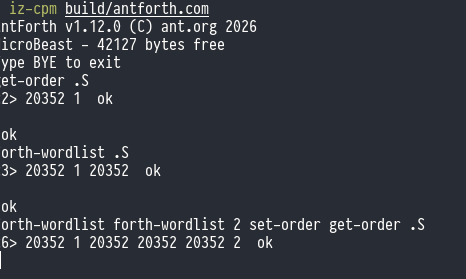
FORTH-WORDLIST
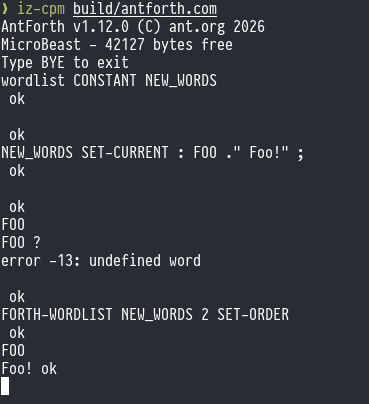
Previously all of AntForth's built-in words lived in the single, anonymous dictionary. In a new multi-dictionary world, their dictionary is but one of many. To get a handle on this dictionary we use the new word FORTH-WORDLIST.
This is essentially a dictionary hash management structure (64 pointers to lists) plus a link pointer to the next wordlist in the chain. The value returned is called a wid (word-list identifier).
WORDLIST
WORDLIST is how you create and allocate a new wordlist. It allocates 130 bytes for the hash-list dictionary structure, initialises it with sane values, and returns the address of this structure in TOS as a wid.
SEARCH-WORDLIST
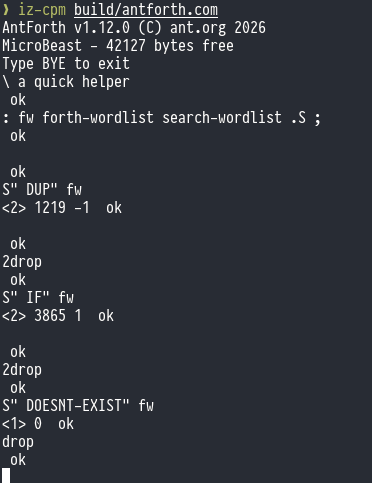
SEARCH-WORDLIST allows you to search a specific word list (and not the entire search order) for the word identified by the given string. If the word exists, it returns the xt for that word, along with a 1 if the word is immediate, or a -1 if it is not.
SEARCH-WORDLIST takes the address and count of the name, plus the wid of the word list to be searched.
GET-ORDER
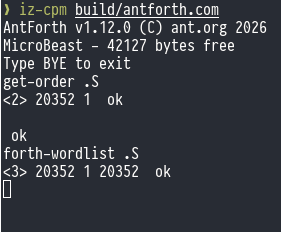
GET-ORDER returns a list of wids that comprise the current search order to the stack, along with the current search depth.
When AntForth has just started, the search-order only contains a single wid ( that for FORTH-WORDLIST) and the search depth is 1.
SET-ORDER
SET-ORDER performs the reverse operation to GET-ORDER: it takes a search depth and a list of wids from the stack and writes the search-order list from them. You can have up to 16 different wids in the search-order.
There's no checking for duplicate wids - it's perfectly permissible (although pointless) to have the same wid appear twice. It means the same wordlist will be searched twice, but obviously if said wordlist contains the word of interest, its first incarnation will find a match and its second incarnation will not be invoked. If the word does not exist, the wordlist will be searched twice, the second being fruitless. It does mean I can make this example though:
GET-CURRENT, SET-CURRENT, and DEFINITIONS
The words we've discussed so far cover searching for words: how do we control which word-list receives a new word definition?
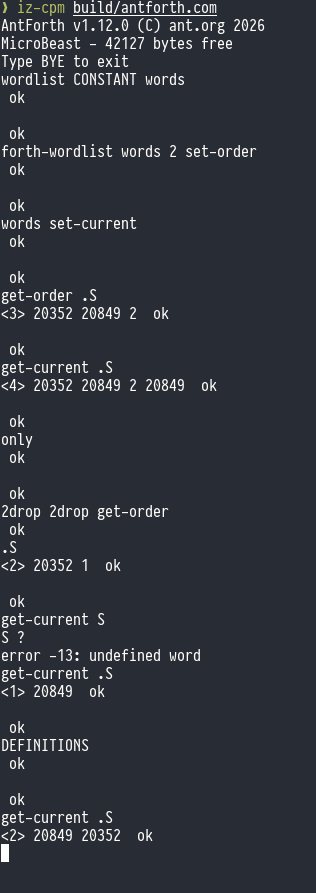
In ANS Forths this is called the "compilation word-list" or sometimes "current word-list", and you can get it with GET-CURRENT (which returns a wid to TOS) or set it with SET-CURRENT which takes a wid from TOS.
DEFINITIONS is equivalent to setting SET-CURRENT to whichever wid is currently first in the search-order: new definitions go to the first dictionary in the currently active set of dictionaries.
ONLY
ONLY is the sole-surviving refugee from the old Forth Vocabulary era: its purpose is to set the search-order back to the default state: that is, a single wid which is that of FORTH-WORDLIST and a search depth of 1.
Note that this doesn't change the setting of the "compilation word-list", so you may want to combine ONLY with DEFINITIONS for a true reset.
antforth
Multi-vocabulary search order
Epic 12 is all about vocabularies and search orders. Up to now, all AntForth words (be they system defined or user defined) have lived in a single dictionary. You may recall that the dictionary is a simple hash-based mechanism that manages 64 separate lists of words: the hashing function balances
Note that ANS Forth's exception handling centres around the THROW, CATCH, ABORT and ABORT" words, which differ from many traditional implementations with words like ALERT, (ALERT), ESCAPE, EXCEPT etc.
Planning
Nothing too remarkable, just the usual cycle of /bmad-create-story, /mad-dev-story and /bmad-code-review finishing off with a retro /bmad-bmm-retrospective.
CATCH and THROW
The CATCH word sets up an exception handling context: any exceptions that are thrown (by the THROW keyword) within the exception context are handled by the code that immediately follows it.
If the exception handling code immediately follows CATCH how do we tell it what code to execute in the exception context - i.e. the code we want to run that might throw ?
We use an execution token, which is Forth's equivalent of a pointer to a function. It's the address of a word's implementation. If you're thinking "that sounds like the Code Field Address of the word" then you'd be right (for an indirect threaded Forth like AntForth).
The usual approach is something like this:
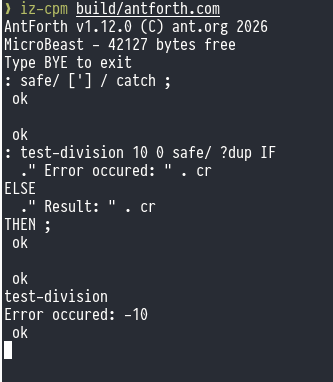
: safe/ ( n1 n2 -- n1/n2 | 0 error-code )
  ['] / catch ;  \ Executes / , catches error if n2 is 0

: test-division
  10 0 safe/ ?dup IF
    ." Error occurred: " . cr \ Handles error (e.g., prints -50, etc.)
  ELSE
    ." Result: " . cr        \ Executes if no error
  THEN ;
Let's see it in action:
We get the xt for the builtin / word and use CATCH to execute it. If that code throws an exception (for example, attempted division by zero) then whatever value was thrown goes in TOS execution immediately resumes with the word following CATCH. Otherwise if no exception was thrown (or if a 0 was explicitly thrown) CATCH pushes a zero onto TOS and continues.
?DUP duplicates TOS only if it is non-zero, so it's only going to DUP if an exception was thrown. If an exception was thrown, ?DUP duplicates the error code so that we can both test it with IFand print it out with .. But if an exception wasn't thrown TOS contains zero, so we don't ?DUP, IF consumes the 0 in TOS and the . in the ELSE clause prints the value of the division operation, which was underneath TOS.
Here's what it looks like when the exception isn't thrown:
THROW simply takes an error code from TOS and throws it:
: check-range ( n -- )
  dup 10 > IF -99 throw THEN ; \ Throws -99 if n > 10
Note that that includes error code 0. The -1 error code is special, and performs the action of the ABORT word (more details below). Similarly -2 is special, and performs the action of the ABORT" ("abort-quote") word, more details below.
Rethrowing
Exception handlers nest, so it is quite acceptable to handle an exception, do some cleanup, and then re-throw the exception to a higher level exception handler:
: managed-word
  ['] risky-word catch
  dup IF \ If an error happened
    ." Cleaning up..." cr
    throw \ Rethrow the original error
  THEN ;
ABORT
ABORT (or -1 throw) immediately quits execution, and, crucially clears the data and return stacks.
: PROCESS-DATA ( n -- )
  DUP 100 > IF
    DROP
    CR ." Value too high, aborting."
    ABORT
  THEN
  . ;

50 PROCESS-DATA   \ Output: 50 ok
150 PROCESS-DATA  \ Output: Value too high, aborting. ok
ABORT"
ABORT" is a compile-time word that parses a string (ending with a "). At run-time, it removes a value from TOS and if it's not zero it displays the string that was defined, then follows up with the usual ABORT sequence (clearing the stacks).
Epic 11 will give us exception handling - the ANS Forth "EXCEPTION" word-set and also the ANS Forth "EXCEPTION-EXT" word-set - although the user should note that as of 2017 "EXCEPTION-EXT" is no longer optional and now considered mandatory, so "EXCEPTION-EXT" is
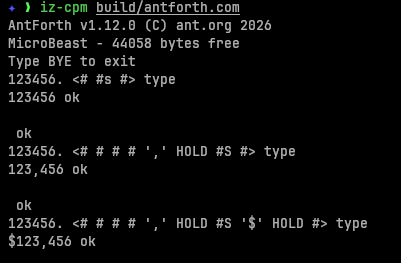
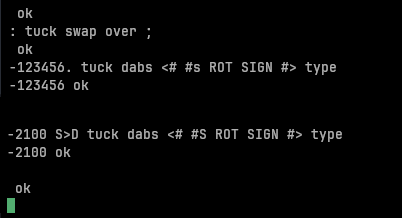
Pictured numeric output is Forth's traditional technique for displaying formatted numeric output. It operates on double precision signed integers, and builds the ASCII representation digit-by-digit from right to left.
You start a conversion with <#, then you get the least significant digit with #. Then the next significant digit with #, and so on. At any point you can say #s which means "as many #s as are left to finish converting the number". You can use HOLD to insert other characters at appropriate junctures.
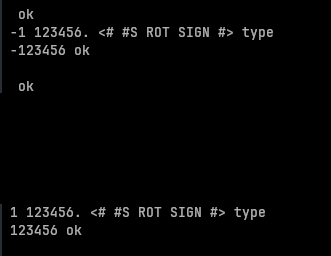
You can use SIGN to print a negative sign if needed, although it's behaviour is a little weird: it takes a (single precision signed) integer from the top-of-stack and it it is negative it prints a minus sign. So you need to have this value on the stack before you start number conversion, and you need to prefix your SIGN word with a ROT word, like so:
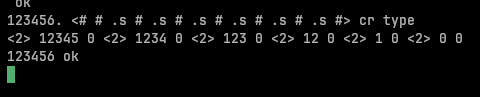
You may be thinking "hold on, what's that ROT in there for?!" - I certainly did. The answer is, at each # step the interpreter is doing ( ud-lo ud-hi -- quot-lo quot-hi ) so there's always a working quotient on the stack until we emit #> - so at the point that we emit SIGN (which must come before #>) the top three entries on the stack are -1 0 0 - our original -1 and two cells for the remaining double precision quotient (which is zero). So the ROT brings the -1 to the top-of-stack so SIGN can consume it.
We can actually see this in action:
TUCK DABS ... ROT SIGN is a common idom in Forth to display a signed double precision number, and S>D TUCK DABS ... ROT is another for single precision signed numbers.
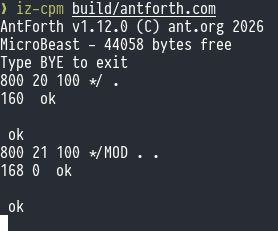
*/ and */MOD
*/ takes three single-precision numbers on the stack (n1 n2 n3 -- n4) - it multiples n1 by n2 giving a douple precision result, then divides that by n3 to give the quotient n4.
*/MOD is similar but it also returns the remainder (n1 n2 n3 -- n4 n5).
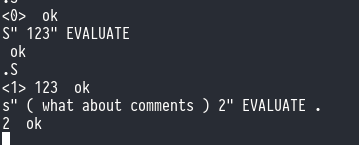
EVALUATE
EVALUATE evaluates Forth code from a string exactly as if you had tyed it in. It's the equivalent to eval() from other languages.
ENVIRONMENT?
The ENVIRONMENT word lets you query certain environmental constants in the system. There are a number of different queries you can make, each identified by name. The name precedes the ENVIRONMENT call and is in the usual Forth (c-addr u --) (start address, count) convention. You'll get back a true or a false in TOS to indicate whether ENVIRONMENT? knows what you are talking about: a TRUE value is accompanied by other pertinent information in the rest of the stack.
Here are the queries AntForth supports:
Name
Type
Constant?
Meaning
/COUNTED-STRING
n
yes
max size of a counted string, in chars
/HOLD
n
yes
Size of pictured numeric output string in chars
/PAD
n
yes
size of scratch area pointed to by PAD
ADDRESS-UNIT-BITS
n
yes
size of one address unit, in bits
FLOORED
flag
yes
true if floored division is the default
MAX-CHAR
u
yes
maximum value of any character
MAX-D
d
yes
largest usable signed double integer
MAX-N
n
yes
largest usable signed integer
MAX-U
u
yes
largest usable unsigned integer
MAX-UD
ud
yes
largest usable unsigned double integer
RETURN-STACK-CELLS
n
yes
maximum size of the return stack, in cells
STACK-CELLS
n
yes
maximum size of the data stack, in cells
AntForth also supports wordset queries from the 1994 ANS Forth standard, although the user should note that the 2012 standard makes these as obsolete:
Name
Type
Constant?
Meaning
/CORE
flag
no
True if complete Core wordset is present
/CORE-EXT
flag
no
True if Core extensions wordset is present
Other values may become available as AntForth supports them.
Epic 10 is all about mopping up the remaining bits of missing functionality that stop us claiming 100% compliance with the ANS Forth Core wordset.
The main omissions are:
* double-precision integers and their operators
* the traditional "pictured numeric output" system for printing formatted numbers
* EVALUATE and ENVIRONMENT? and
Epic 9 is all about making numeric literals in AntForth more pleasant to use.
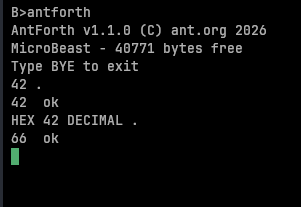
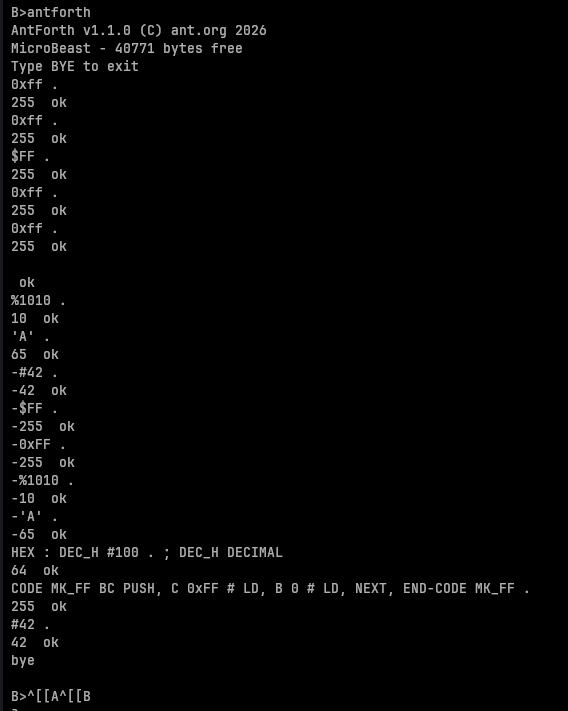
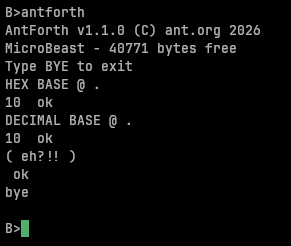
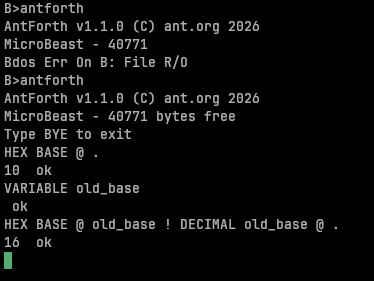
Currently, when you type 42 then decimal 42 goes onto the stack, and if you actually wanted 0x42 hexadecimal then you'd write HEX 42 DECIMAL .. Both HEX and DECIMAL change the radix that'
With an entire epic of refactoring under our belt, AntForth is lean and mean! It's time to focus on adding some new functionality. Here's what I want to add in Phase 2:
* Add the ability to prefix hex numeric literals with $ and binary numeric literals with
The smallest z80 assembler I can find is Kroc's v80, which is a table driven assembler that weighs in at 6.7 KB according to the author. I'd give you a link, but he's deleted the entire repo as an act of anti-AI defiance. Oh dear. (Ironic that I only discovered v80 through the AI search thingy at the top of google search).
But if his post is to be believed, AntForth is 1.8 KB off the pace.
I'd noticed that there was a lot of duplication in outputting console messages, with a lot of places in the code setting up their own BDOS calls. In addition it seemed like there was a lot of duplication, particularly around stacking registers, that might benefit from factoring out the common functionality (which is a very Forth thing to do!).
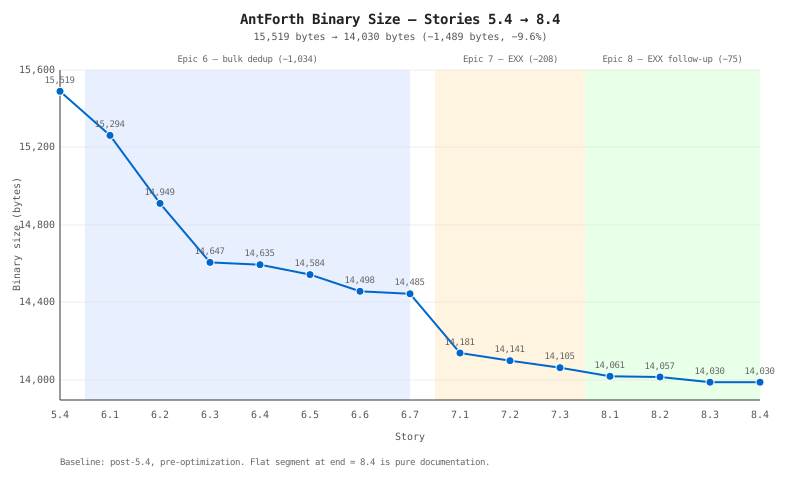
I assembled the LLM team and set them to finding opportunities to reduce the code size. We created a new epic 6 just for optimisation, covering the stdout type stuff I already mentioned, and various 'peephole' optimisations around refactoring code. They came up with an ingenious LD, rework on their own.
At every story in this sprint the assembler remained fully functional whilst gradually reducing in size. No regressions at all.
While doing the retro at the end of sprint 6, it occured to me that much of the complexity that remained in LD, (and in many other words) was to do with stacking registers while we juggled them for other purposes - something that the alternate register set would be ideal for, and which we hitherto had not used at all.
Cue epic 7 (only 3 stories this time) for shadow register optimisations.
During the retro for epic 7, a few more optimisations were identified, including that we hadn't taken advantage of EX AF, AF' either, so another epic (8) was created, with 4 short stories this time around.
TL;DR - how big is it now?
After 14 sprints-worth of refactoring, the final binary size is:
** 13.7 KB **
That means our assembler is 6.9 KB, so we're roughly 200 bytes larger than the most compact assembler on record - 1.5 KB smaller than the original implementation!
MVP is done! Before starting to think about additional phases and new features, I wanted to do a bit of optimisation for code size, in part prompted by the tentative offer of putting AntForth into the MicroBeast's romdisk - where space is at a premium.
When we made
The last story in the current epic is a review of our compliance to the ANS Forth "Core" wordset.
The result: 72.2% compliance
Some of this is deliberate omission: I chose to exclude double precision cells and Forth's quirky number formatting system from MVP.
Others
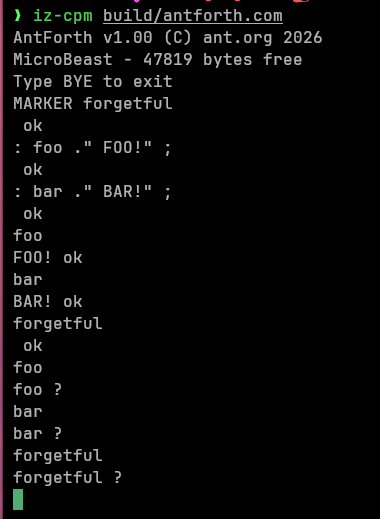
This sprint brings us the MARKER word which lets us undo word definitions. The way it works is, you type MARKER foo and then go about your business, defining words and variables etc. At some future point you can type foo and it will restore the dictionary to the state
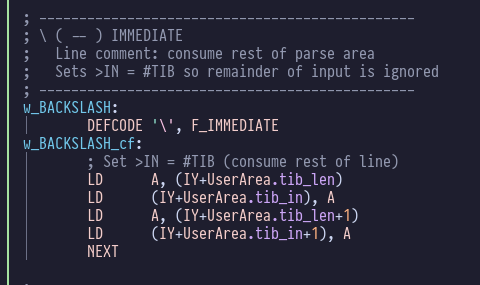
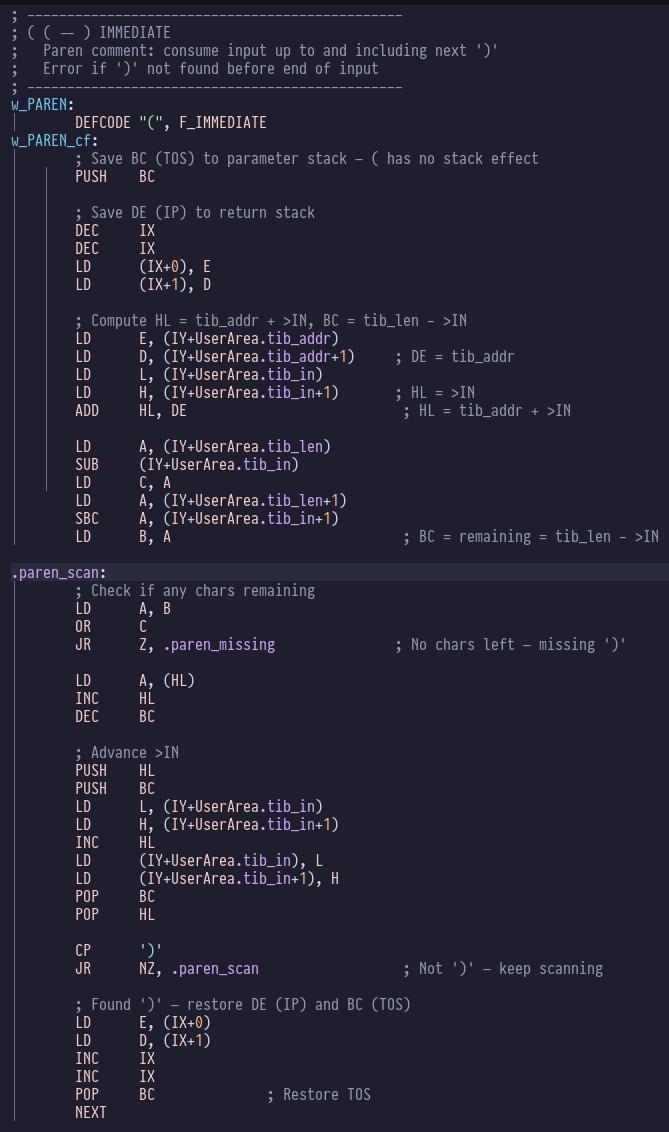
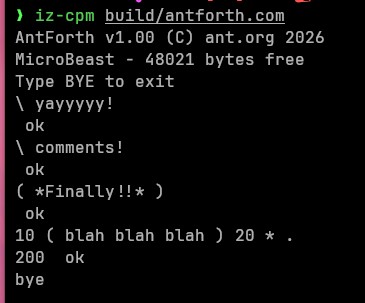
It's all been a bit "jazz improv" recently as we fought to get ourselves to 100% coverage of z80 opcodes. Hopefully we are now back on track as we queue up /bmad-bmm-create-story 5.1 - finally, the elusive comments!
We kick off development with /bmad-bmm-dev-story 5.